Social media post composer with live previews
Write, preview and polish posts with all your media in one place.
Create post brings your images, videos and captions together with a live preview for each network, so you see the crop and caption before anything goes out.
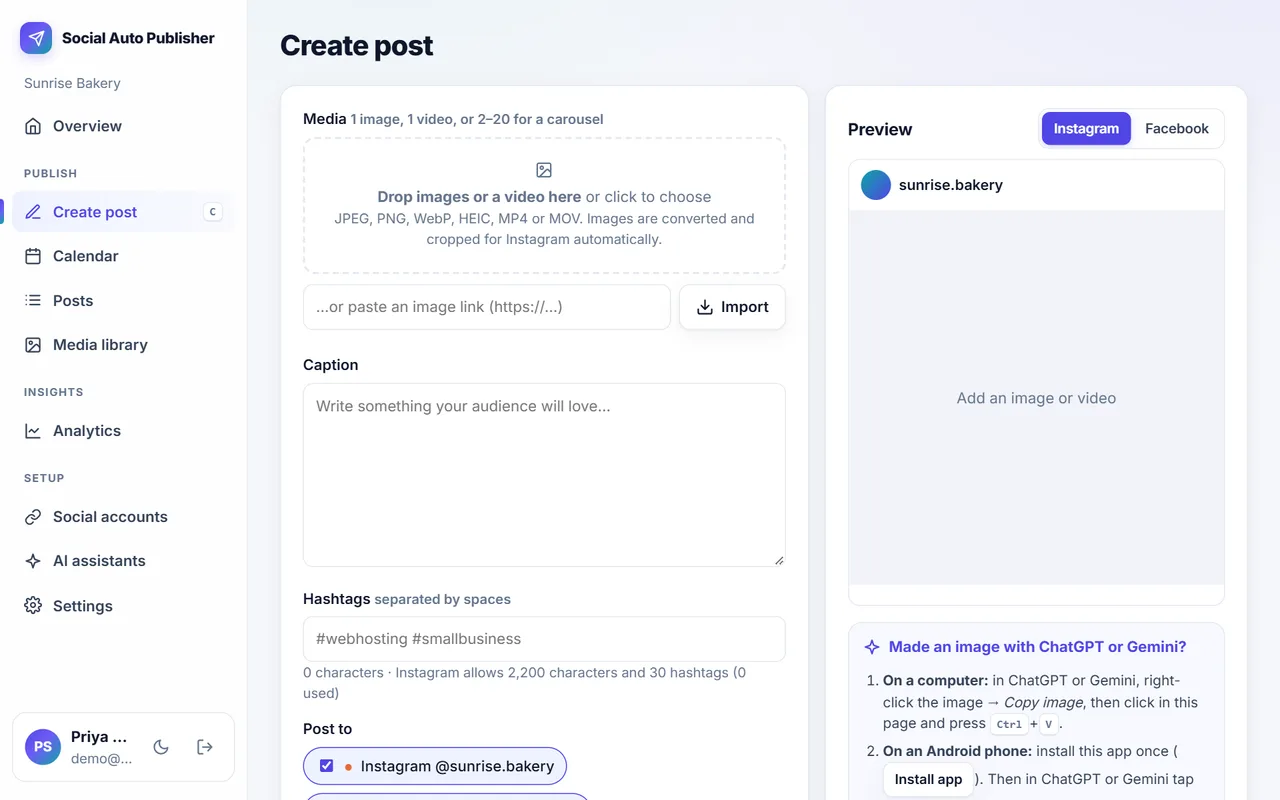
Bring media from anywhere
Upload, paste, drag in, import from a link, or pick from the Media library. Images from ChatGPT, Gemini, Canva and other tools work too.
Live preview per network
See how the post looks on Instagram, Facebook and LinkedIn, including Instagram's 4:5 to 1.91:1 crop.
Limits checked as you type
Character and hashtag counters warn you before Instagram's or LinkedIn's limits are hit.
Media library
Every upload is kept in one library, ready to reuse or delete.
Carousels
Combine several images or videos into one carousel post.
Keyboard shortcut
Press C anywhere in the dashboard to start a new post.
How to use it
More products
Post Composer & Media Library: frequently asked questions
Can I preview how the post will look?
Yes. The composer shows a preview for each channel with the real crop, so you can fix images before they go out.
Does it resize images for each network?
Yes. Images are converted and resized automatically to suit each network.
Can I paste an image from ChatGPT or Canva?
Yes. Paste it, drag it in, pick it from your Media library, or share it from your phone.
Try it with next week's posts
The free plan needs no card. Set up takes about ten minutes.
Create your free account